
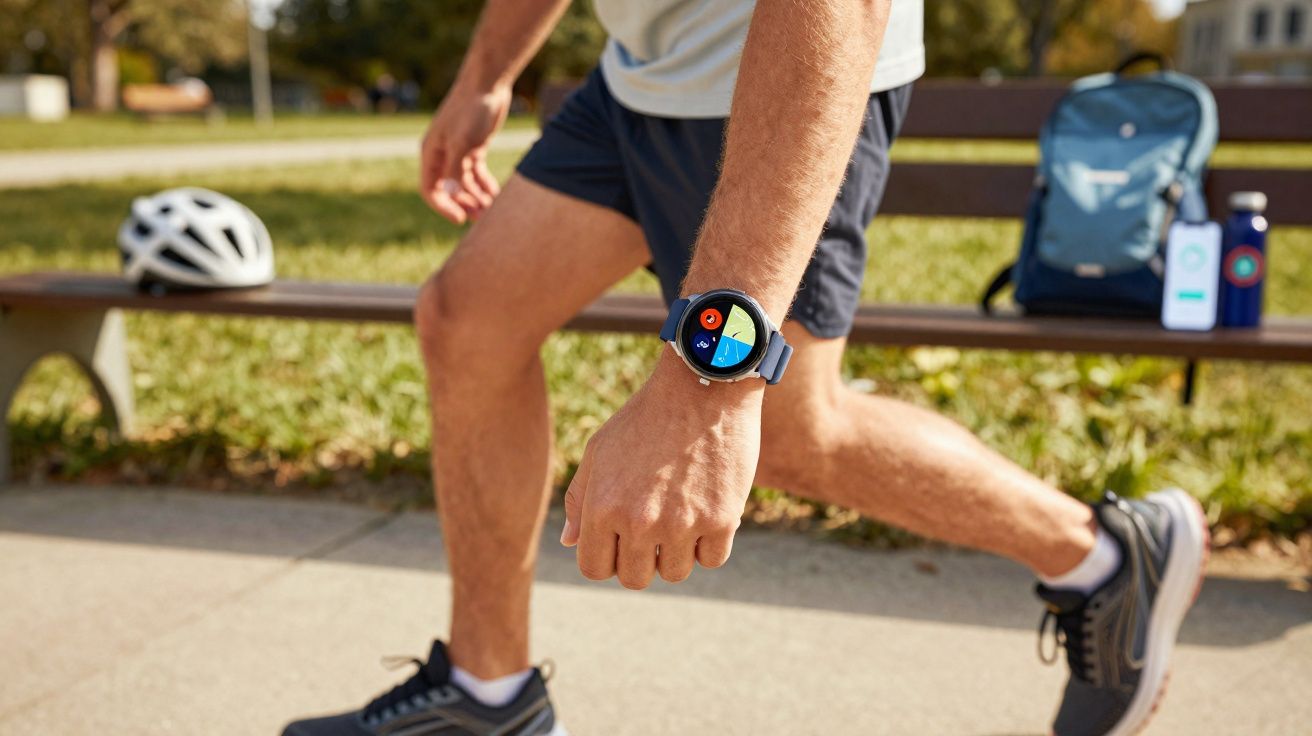
A budget sports watch with a vivid AMOLED screen, built‑in GPS and stress tracking can sound a bit too good to be true at this sort of money.
Decathlon reckons it has found the sweet spot: an almost fully featured fitness smartwatch for under £70, aimed at casual runners and day‑to‑day wearers who still want “proper” tracking. After wearing the new Decathlon Fit 100 for several weeks, the real question isn’t only what it offers - it’s what compromises were needed to hit the price.
What Decathlon is really selling with the Fit 100
The Fit 100 is Decathlon’s latest own‑brand smartwatch, listed at €69.99 (roughly £60). It sits beneath the company’s more performance‑focused GPS watches co‑developed with Coros, and it’s built for anyone who wants health metrics, step counts and notifications without paying Apple Watch prices.
AMOLED screen, multi‑GNSS GPS, heart‑rate and SpO2 sensors, 5 ATM water resistance and a week‑long battery - all under €70.
On the spec sheet, it looks unusually generous for this bracket:
| Model | Decathlon Fit 100 |
|---|---|
| Screen size | 1.97 inches |
| Screen type | AMOLED |
| Resolution | 390 × 450 pixels |
| Weight | 90 g (with strap) |
| Battery life | Up to 7 days standard use / ~8 hours with GPS |
| Sensors | Multi‑GNSS GPS, optical heart‑rate, SpO2, accelerometer, compass, sleep and stress tracking |
| Water resistance | 5 ATM |
| Sports modes | 14 on the watch, ~50 configurable via app |
| Compatibility | Android 8.0+ and iOS 12.0+ |
| Connectivity | Bluetooth |
| Sizes | S and M |
| Price | €69.99 |
A familiar design that doesn’t pretend otherwise
From a few metres away, the Fit 100 could be mistaken for an Apple Watch: a rectangular case with rounded corners, a digital crown on the right, and an all‑black colourway. Up close, it’s clearly built to a budget. The body is plastic with an aluminium‑look finish, so it lacks that cool, metallic feel, and the join between the sidewalls and the underside is easy to spot if you examine it.
The TPU strap is perfectly serviceable but not especially premium. The upside is the use of quick‑release pins, making it easy to fit a third‑party strap in seconds rather than being locked into the stock band.
At 90 g including the strap, it’s heavier than plenty of dedicated fitness watches, but the weight distribution is decent and it remains comfortable in everyday wear. It’s also practical to sleep with if you’re keen to collect sleep metrics.
With a 5 ATM rating, the Fit 100 is suitable for pool swimming and open‑water sessions. Decathlon does, however, advise avoiding hot showers and saunas, as heat and steam can put extra strain on seals - particularly in more affordable casings.
An AMOLED screen that makes cheap watches feel dated
The 1.97‑inch AMOLED screen is the standout feature. Colours look punchy, blacks appear properly deep, and even crowded workout screens stay readable when you pack in multiple data fields. At 390 × 450 pixels, text and icons are crisp enough that nothing feels fuzzy or low‑rent.
Outside, the brightness performs better than you might expect. It won’t reach the eye‑watering peak levels of the newest Apple Watch or Pixel Watch, but during runs in strong sunshine it stayed readable without constant wrist gymnastics.
The Fit 100’s display looks closer to a mid‑range smartwatch than a bargain‑bin tracker, and that changes how it feels on the wrist.
There’s also an always‑on display mode, keeping a simplified watch face visible continuously. The trade‑off is predictable: enabling it roughly halves battery life, which is hard to avoid with a device in this price and battery class.
Simple software that deliberately avoids complexity
Control is split between touchscreen swipes and the rotating crown. A swipe down pulls in notifications, swipe up reveals quick settings (brightness, do‑not‑disturb and similar toggles), and side swipes move through widgets for steps, heart rate and weather. Pressing the crown opens the app grid or returns you to the watch face.
Rather than running Wear OS or another open ecosystem, Decathlon uses its own operating system. That helps the watch feel snappy and keeps the experience consistent on both Android and iOS - but it comes with a major limitation: there are no third‑party apps.
The Fit 100 is designed to stay basic on purpose, trimming features so new users aren’t buried under menus and settings.
That means no Spotify downloads, no on‑wrist Google Maps, and no extra wellness apps you can add later. The focus stays firmly on activity tracking, health stats and notifications, which will be enough for the people this watch is aimed at.
Decathlon Hub: the app that holds it together
For anything beyond the basics, you’ll be using Decathlon Hub, the companion app for Android and iOS. It’s where you adjust sport profiles, design your workout data pages and review your training history.
The app’s dashboard lays out daily activity, sleep charts, resting heart rate and stress trends in a clear, no‑nonsense style. It isn’t as polished as Garmin Connect or as tightly integrated as Apple Health, but the essentials are present and easy to find.
- Automatic sync of workouts to Strava
- Configuration of up to ~50 sports profiles
- Custom data screens per sport
- Sleep and stress history with basic trends
Syncing can sometimes take a little while, especially after a longer run. On the plus side, starting an activity on the watch is typically quick - which is arguably the more important moment, just before you begin a session.
A note on accounts, permissions and data
Because deeper analysis sits in Decathlon Hub, you’ll want to be comfortable with the app’s permissions (location for GPS maps, Bluetooth for syncing and notifications, and health data access). If you’re privacy‑conscious, it’s worth reviewing what you enable and when - particularly if you plan to auto‑export to third‑party services such as Strava.
Sports tracking on the Decathlon Fit 100: strong features, mixed accuracy
Straight out of the box, you get 14 sports modes on the watch, including running, cycling, walking, strength training, pool swim, open‑water swim, rowing, treadmill and hiking. In the app, you can expand this to roughly 50 profiles, although many are variations on the same underlying metrics with different labels.
During workouts you can view duration, distance, pace/speed, heart rate, calories and more. Screens are configurable, so runners can prioritise pace and lap time, while gym users might keep heart rate and session length front and centre.
The inclusion of a multi‑GNSS GPS chip is one of the headline upgrades at this price. Satellite lock is often achieved in a few seconds, which is genuinely helpful if you’re squeezing training into a lunch break and don’t want to loiter outside waiting for a fix.
Accuracy is where the affordable pedigree can show through. In one widely discussed test - an officially measured 20 km race in Paris - the Fit 100 recorded only 17.8 km, an error of about 11%. The analysis pointed towards the GPS not properly engaging, with distance likely estimated from steps and arm swing. That’s a software/firmware failure rather than normal behaviour, but it highlights the risks of a newer platform.
For casual tracking the GPS is acceptable; for pace‑sensitive training plans or race prep, that kind of glitch is a serious red flag.
On other runs, recorded distance landed within the more typical 1–3% variation seen on entry‑level GPS watches. Even so, if you routinely do intervals, tempo sessions or race‑pace work, you may prefer a more established ecosystem with a longer track record for reliability.
Tips to get the best results from built‑in GPS
Fit matters: a snug strap helps reduce sensor wobble, which can improve both GPS stability (less erratic arm movement) and heart‑rate readings. It also helps to wait a moment after the “GPS ready” prompt before starting - especially in built‑up areas - to give the watch time to settle its position.
How Decathlon actually tests a €70 smartwatch
Decathlon puts the Fit 100 through two broad stages of validation. In the lab, the emphasis is on durability and ageing: waterproofing checks, repeated button‑press cycles, UV exposure, hot/cold chamber testing and strap pull tests. The aim is to catch early hardware weaknesses before products reach shelves.
Field testing follows, with devices used by internal teams and external testers through co‑creation programmes. That’s where GPS behaviour, heart‑rate performance and swim tracking are assessed in real conditions. It also explains why a rare GPS failure like the Paris race example might not appear in routine testing: edge cases can still slip past even a structured test plan.
Heart rate, sleep and stress: good enough for most people
The optical heart‑rate sensor runs continuously, capturing your pulse through the day and overnight. At rest and during steady efforts (easy runs, brisk walks, gentle rides), results generally align with expectations and compare reasonably with reference devices.
High‑intensity work is tougher. In intervals or short bursts, peaks can appear a few seconds late and sharp surges may be smoothed out. That’s common for wrist‑based sensors at this level, but it does reduce usefulness if you’re analysing tight heart‑rate zones.
Pairing a separate Bluetooth chest strap remains the better option for anyone training with strict heart‑rate targets.
SpO2 is included, but it’s best treated as a wellness feature rather than anything clinical. It may help you spot broad trends when you’re fatigued or travelling at altitude, yet wrist‑based measurements aren’t accurate enough to serve as a medical benchmark.
Sleep tracking runs automatically, logging total sleep time, estimating light/deep/REM stages, and marking awakenings. Bedtime and wake‑up times tend to match what you remember, while stage breakdowns should be seen as approximations - which is true of nearly all consumer sleep wearables.
Stress tracking is derived from heart‑rate variability (how much your heart rhythm varies beat to beat). The Fit 100 converts this into a daily stress curve and may suggest guided breathing when readings spike. It’s not a diagnosis; it’s more of a prompt to pause, which can still be useful on hectic days.
Smart features: only the basics made the cut
On the smartwatch side, the Fit 100 sticks to the essentials. You can receive notifications for calls, texts, emails and app alerts, and you can take phone calls over Bluetooth when your phone is nearby. Call quality is fine for quick conversations.
The missing features help explain the low price. There’s no NFC, so there are no contactless payments. There’s no offline music storage and no streaming controls. There’s also no voice assistant, and the closed platform means you shouldn’t expect extra apps later.
The Fit 100 behaves more like a robust fitness tracker with a big, bright screen than a full smartwatch replacement.
Battery life that competes with far pricier devices
Decathlon claims up to seven days of battery with “normal” use (all‑day tracking, notifications and a few workouts each week). In practice, six to seven days is realistic as long as you keep always‑on display switched off.
Turn always‑on on and you’re looking at roughly three to four days, which is still strong at this cost. With continuous GPS recording, endurance is around eight hours. That’s enough for most road races, city marathons and long rides, but it won’t cover multi‑day treks or ultra‑distance events.
Charging is via a proprietary magnetic cable and takes about two hours from empty to full. It isn’t “fast charging”, but with roughly a week between charges for many users, it’s manageable.
Where the Fit 100 sits in Decathlon’s long‑term strategy
Within Decathlon’s line‑up, the numbering broadly reflects intent: 100 for entry level, 500 for mid‑range and 900 for advanced. The Fit 100 looks like the first step in a wider smartwatch range rather than a one‑off experiment.
That points to a likely progression: a Fit 500 with upgrades such as more dependable GPS or payments, and a Fit 900 that could sit nearer the existing Coros‑powered GPS900 for serious endurance training. For shoppers, this matters because it shows Decathlon isn’t trying to force every feature into the Fit 100 - it’s building a ladder for different budgets and needs.
How to know if the Fit 100 is enough for you
If your aims are straightforward - hitting 10,000 steps, recording a few runs each week, getting a feel for sleep quality, and reducing how often you pull out your phone - the Fit 100 covers most bases. The kinds of inaccuracies that show up in race scenarios or hard interval sessions are unlikely to matter if you mainly want general movement data and approximate distances.
If you’re preparing for a first 5K or 10K, it can still be a helpful motivator. Watching distance totals rise, seeing heart rate ease on familiar routes, or building weekly volume provides tangible proof of progress even if every metre isn’t perfectly measured. The important bit is treating the numbers as indicative rather than laboratory‑grade.
If you’re following a structured plan with strict pace targets and defined zones - or chasing something as serious as a Boston qualifier - the Fit 100 is better viewed as a spare. A dedicated GPS watch with proven accuracy and richer workout export tools will suit that job far better.
Some terms and trade‑offs worth understanding
Two phrases come up a lot with the Fit 100: multi‑GNSS and single‑frequency GPS. Multi‑GNSS simply means the watch can pull signals from several satellite networks - typically GPS (US), GLONASS (Russia) and others such as Galileo (EU). In city streets or wooded areas, that broader choice can improve coverage compared with GPS alone.
Single‑frequency means the watch listens on just one satellite signal band. More expensive devices can use two (often labelled L1 and L5), which helps reduce errors caused by reflections from tall buildings and can cut down route “drift”. That’s a key reason premium watches tend to trace cleaner lines through skyscraper canyons or twisty trails.
Optical heart‑rate sensing has its own limitations, too. The sensor shines light into the skin and reads changes in reflection as blood pulses. Movement, tattoos, skin tone and strap tightness can all influence results. If your training depends heavily on heart‑rate zones - for example in polarised plans - wrist data is best treated as guidance, with a chest strap reserved for sessions where accuracy really matters.





Comments
No comments yet. Be the first to comment!
Leave a Comment